Guide
App Store screenshots for AI apps: show the result
October 25, 2026 · 4 min read
A chat screen alone rarely explains what an AI app helps someone accomplish. Show a relevant input, the kind of output the product returns, and the next step a person can take with it.
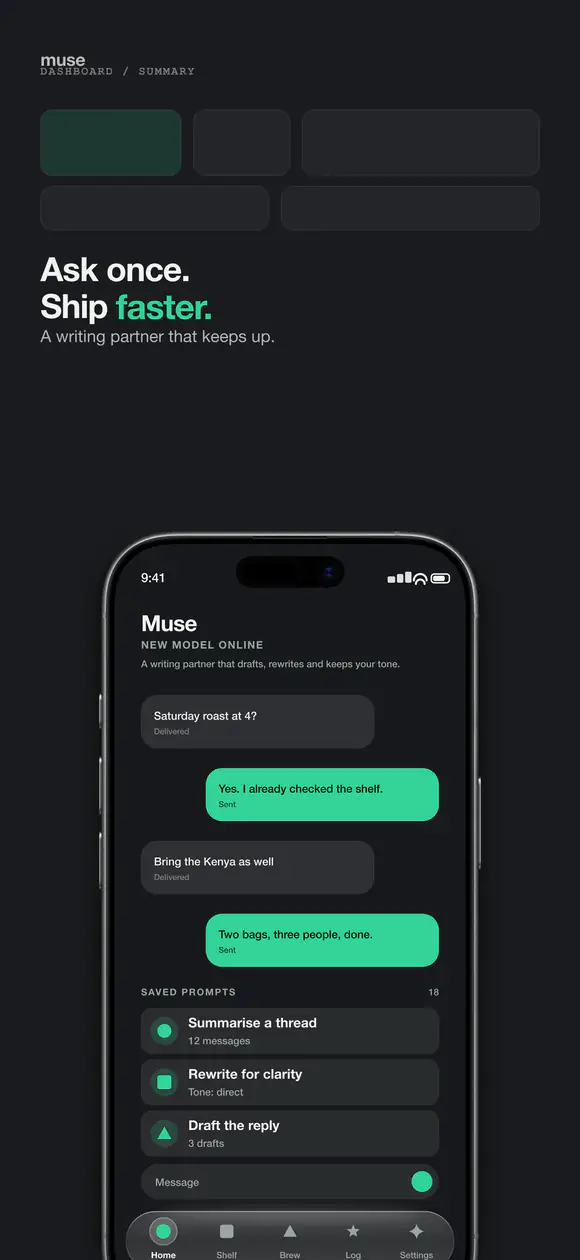
Real template preview · slide 01
Add a short prompt
Show a representative prompt or source.
Show input and output together
Choose a representative prompt, upload, or action and pair it with the result. Keep enough context to make the transformation clear, but remove personal or sensitive information from example data.
Use concrete use cases
Show a few distinct tasks the app supports, such as drafting, summarizing, or organizing, only when those capabilities are present. A specific workflow gives a prospective user more information than a generic AI badge.
Represent speed and quality honestly
Do not imply a guaranteed response time or perfect result unless the product can support that claim consistently. If output quality depends on user input or review, let the screenshots show the human step in the workflow.
Make privacy information discoverable
If data handling is a meaningful concern for your audience, explain the relevant product behavior in accurate, plain language. Keep the statement consistent with the app's privacy disclosures and current store listing.
Use real, reviewed examples
Check generated examples for factual errors, inappropriate content, and private information before exporting. Use captions to explain what the image demonstrates, not to promise outcomes that one example cannot establish.
Build a short input-to-result storyboard
A clear set can start with the task, show a representative input, reveal the generated result, and finish with the way a person edits, saves, or shares it. Use the actual interface at each step so the sequence explains how the product works rather than presenting disconnected mockups.
For example, a writing assistant can show a brief prompt, a draft, and an editing control. A photo tool can show the source image, the transformation, and the final export. Choose only workflows that are available in the app you are submitting.
Set expectations about AI output
Avoid implying that a generated answer is always correct, original, or suitable without review. If people need to verify facts, check a result, or provide their own input, make that step visible in the product story.
Use synthetic sample data that has been reviewed for privacy and accuracy. Remove real names, account details, faces, and confidential documents unless you have permission and a clear reason to include them.
Show variability without suggesting a guaranteed answer
AI output can vary with the prompt, model, and available context. Choose a representative result and avoid wording that promises every user will receive the same quality, accuracy, or response time.
If the product includes review, editing, or a regenerate action, showing that control helps set a more realistic expectation. The screenshots should describe a tool people can guide, not an infallible decision-maker.
Make the data flow understandable
When a workflow uses uploaded files, photos, or personal notes, explain the step only as precisely as your privacy practices allow. Keep examples anonymized and confirm that the listing language agrees with the privacy disclosures.
Do not include real prompts from customers or internal testing without permission. A fictional example is often enough to show the workflow and is safer to review for confidential information.
Review examples for trust and disclosure
A realistic example should not imply that a generated result came from a real customer if it did not. Use clearly controlled sample content, and ensure the screenshot does not expose a prompt, file, or personal detail from internal testing.
Where the app handles sensitive inputs, link the visual explanation to accurate privacy information elsewhere in the listing. Do not promise that data is never stored, shared, or used unless the product and policy support that statement.
Show the human decision in the workflow
Many useful AI experiences include a person choosing a prompt, editing a result, selecting a tone, or confirming an action. Showing that decision can make the product easier to understand and avoid suggesting that an automated output is final or guaranteed.
For consequential outputs, such as health, finance, or legal information, do not imply expert review or a level of accuracy the product does not provide. Keep examples and claims within the app’s actual intended use.
Select examples that are easy to verify
Use an input with a visible purpose and an output that can be understood in a few seconds. Have a product reviewer confirm the result is plausible, safe to show, and representative of what the current version can produce.
Avoid cherry-picking a polished result that requires hidden manual work unless the screenshot also explains that work. A realistic workflow sets better expectations than a showcase result without context.
Show the AI workflow clearly
Build a sequence that gives the input, result, and product interface room to read.
Open App Snaps